Timetable overlay
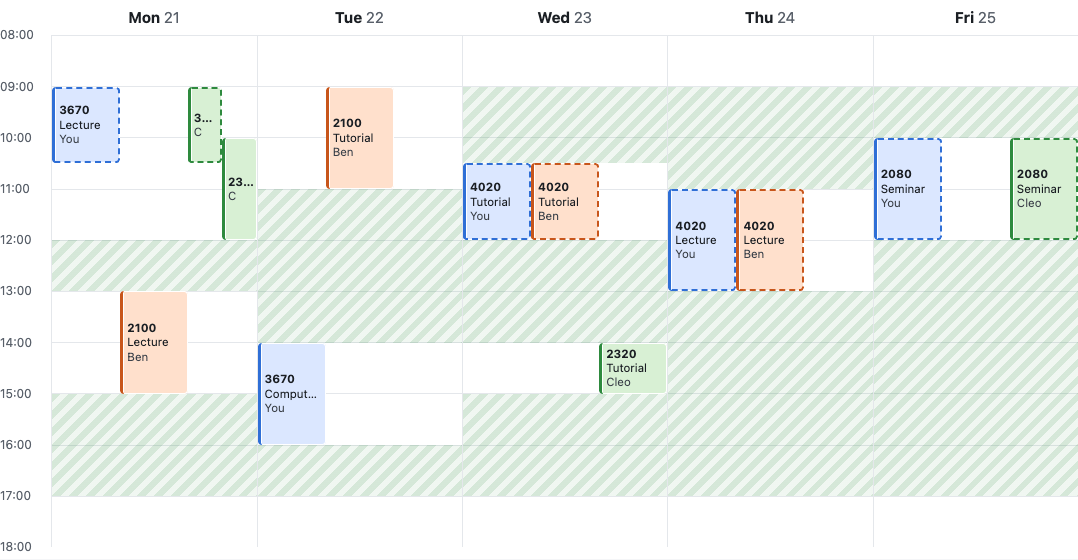
ANU’s MyTimetable shows you your own timetable and nobody else’s, so working out when you and your friends are free, or whether you ended up in the same tute, means screenshots in a group chat. This app puts your week and your friends’ weeks on one grid. You import the calendar file MyTimetable already exports and swap share codes with friends, and the overlay shows everyone’s classes side by side, the classes you share, the gaps when you’re all free, and where everyone is right now.
What good looks like here
Data. I’ve built the app on the data students already have, the .ics
file MyTimetable exports, rather than on a catalogue of courses. The first
plan was a hand-seeded catalogue with dropdowns for picking tutes, and my own
export killed it: the file only contains my groups, so a seeded catalogue
could never offer a friend a different tute. Instead the catalogue builds
itself from imports. Two friends who both import COMP4020 TutA 04 hold the same
class row, and that is what “you share a tute” means here, that is, a match on
a real row rather than a guess from course codes and times.
Schema. The schema follows Allocate+, which MyTimetable runs on, not my assumptions about timetables. My first schema keyed classes on a kind (lecture, tutorial, lab), and the real export broke it, since COMP3320 runs LecA and LecB as separate activities, each group 01, and labs come in parts (a lab, then its drop-in half an hour later). Classes now key on Allocate+’s own activity code, and one class can meet several times a week. The export’s dates are kept too, as they already know which weeks a class doesn’t run. There’s no Monday lecture on Labour Day and nothing in the teaching break, so the grid shows a real week, and an in-class assessment is a session with a single date that appears in the week it happens. Regarding what’s shared, only a class’s identity is. When it meets and what its course is called are each person’s own, taken from their export, so nobody’s import can move or rename a class in anyone else’s week.
Identity. There are no accounts. A timetable is a name and a secret cookie, and friends are added by a six-character share code that leaves out 0/O and 1/I/L, since codes get read aloud across a room. Knowing someone’s code is the permission to overlay them, so the app shows who has added you and lets you remove them, replace your code, or delete your timetable from every device and every friend’s overlay. Guessing codes is slow on purpose: after 20 codes that don’t match in ten minutes, a client is refused, even for a right code. The export is easiest to download on a laptop, but “who’s in class right now” is a phone question, so a timetable can be linked to more devices with a one-time code that works once, within ten minutes. Both that code and the share link come with a QR code, since moving something from a laptop to a phone is a scan, not a typed address.
Interface. Signed in, the home page is your week. Friends and your own data have a page each, rather than one long settings scroll. Removing someone happens straight away and offers an undo, instead of asking first, because undo is the kinder pattern for a one-tap action. That makes undo a security question too: it re-creates a follow without a code, so it only ever reverses a removal you really just made. The page works without JavaScript (every action is a plain form), and copy and share buttons appear only where the browser can do them. It follows the system’s light or dark setting. On the grid, classes share a day’s width only when they overlap, so it stays readable with a crowd. The first version gave each person a fixed lane, and at eight people every class was a sliver.
What I looked at. Above all, my own MyTimetable export and a screenshot of my week in MyTimetable. While planning, the agent read ANU’s descriptions of MyTimetable and its timetabling procedure (self-allocation, lock-in before census) and tried the public Timetable Viewer, whose class times it couldn’t reach.
What I chose not to build. Accounts with passwords, which would have cost the day before the overlay existed. A tute swap board, which I considered and passed over for the overlay. The agent also ruled out importing from a calendar subscription URL, since the server would have to fetch addresses users supply.
Checks. spec/ holds what can be checked mechanically:
- the parser, against a verbatim excerpt of a real export
- that an import survives a reload and a re-import replaces it
- that “shared” means the same group, not just the same course, and that a stranger’s import can’t move or rename a class in my week
- the week grid against the export’s dates, including Labour Day
- the free-time gaps, and that a class overlapping nothing gets the day’s full width however many people are shown
- linking devices, removing people who can see you, deletion, and share links
- that undo can’t be used to follow someone whose code you never had
- that each QR code draws exactly the link shown beside it
- the limit on guessing codes
- every migration, from the previous state with data in it
- the live stream telling open overlays who changed, and nothing else
- the accessibility floor on signed-in pages, and that every image loads
Colour contrast was checked by hand in a real browser, in both themes, as the spec’s axe pass runs without one. Whether the grid is actually readable, and whether this beats a group chat, is for a person to judge.
Limitations. Losing the cookie on every device a timetable is linked to loses the timetable, since there’s nothing else to prove it’s yours. Course codes are assumed to mean this semester, as the app doesn’t track which session an import came from. The limit on guessing codes lives in memory, so a restart resets it. That’s acceptable only because the app runs on one machine and restarts are rare. “Right now” refreshes every five minutes on an open page, not continuously.